Ollama Cloud for Coding
If you’re using AI code assistance, you’re likely familiar with Ollama. You might have heard about coding with Ollama, reducing or even removing your plans with AI providers to run models locally; this keeps your wallet and data safer.
Most people who talk about local models either have access to powerful home labs, high-end data centers, or the financial means to buy a top-tier GPU. Running even a small model with 40B parameters reliably requires serious hardware; something not everyone can afford. That’s why Ollama Cloud stands out. It lets you run large open source AI models (with hourly, weekly, and monthly limits at a price).
Like other AI provider services, they have their monthly plans. And for more than a month, I tried their $20 plan; testing it with OpenCode. This blog is one part documentation of my usage and another part review of the service for coding.
Initial Takes #
Once upon a time, I used Ollama for running local models. That was 2023 into 2024. Then I stopped because I had access to several AI provider services (which worked better for code assist). In 2025, we saw an increase of good quality Open Source (and open weight) models. Ollama started its cloud service in 2025 to allow users to authenticate and call large models hosted on their compute.
For most of 2025, from its initial release, I didn’t pay the service much attention. OpenRouter offered cheap API access to all the large Open Source models. And I was claude-pilled, living ignorantly in the “only use Opus and Sonnet. Ultrathink”. That was until I decided to try out OpenCode, in the beginning of December 2025; partly because the neovim plugin was way better than the claude code neovim plugin.
As I navigated through my experiments, I found myself relying heavily on Claude and other models to help code my own agents. By combining Claude models with Open Source options, I was able to streamline the process. However, my initial use of these models led to a ban due to violating their terms of service. I was surprised by how quickly this happened; especially since I was simply making parallel calls to Claude using my Claude Code subscription, similar to what OpenCode and Oh My Opencode offered.
Later, I noticed that bans were becoming more common across OpenCode, particularly among users who opted for Oh My Opencode. Ultimately, I was annoyed that I could easily lose access to my prompt history and conversations over something trivial and I decided to purchase the Ollama Cloud subscription out of spite, with the desire not to use a big AI provider subscription. It was… a learning curve.
At my last job, I was always telling engineers within my org, “Use the right model for the right use case.” That is definitely the case when exploring and using the cloud models in Ollama Cloud. Now what I write here is mostly applicable to this December 2025 to January 2026 period. The recommended models will have changed when you, yes you in the future, are reading this blog.
I was actually impressed with Ollama Cloud because they generally released new trending Open Source
models within the week of their release. Surprisingly, you could use Gemini 3 Pro and Gemini 3
Flash! However, Gemini 3 Pro uses premium usage, which you are very limited on in their plans.
Another surprising note was Devstral. There must be a deal going on with Mistral because throughout
December I was able to leverage the devstral-2:123b model without consuming limits.
Learn You Some Basics #
Before I get into the meat of it, I want to go over some of the basics with LLMs and inference. That way my config and Ollama Cloud usage will make more sense.
Understanding how modern language models generate responses is crucial for anyone working with AI tools. Let’s break it down in simple terms:
- context window: determines how much information the model can process at once. A larger window helps it remember more of your conversation or document, making responses more coherent.
- temperature: controls the model’s creativity. A lower value makes it more focused, while a higher value encourages more varied and imaginative answers.
- top-p: helps the model prioritize the most likely words, ensuring responses stay relevant and coherent.
- top-k: limits the model to the top k most probable words, reducing randomness and increasing control over output.
- budget tokens: used in models that support thinking, for allocating a portion of their processing power to generate thoughtful, detailed answers.
Language models are just next token predictors. You give your model your prompt and some context (markdown, code, output, etc) as inputs. Through the process of Tokenization, the text (in text language models) is broken down into tokens; which can be a word, punctuation mark, or even part of a word. For example, if you were to talk about the “cat poop box” to a LLM, it would break that into [“cat”, “poop”, “box”], find relevance the parameters of training data and know you are talking about a “litter box”.
When a model processes the tokens, it is holding all of them in the context window. That includes your prompt, the context, the output, your new prompt, the additional files it reads to understand what you’re saying, the output, and so on. This can be crucial for selecting a model for the right task.
For a LLM to be useful in coding, it must be able to make tool calls. In fact, I’m pretty sure you
can’t use a language model unless it has tools as a capability. This is because it will need to
integrate and execute commands. Keep in mind that any model used for code assist will need to
allocate some amount of tokens for context on how to make tool calls.
Another capability that isn’t necessary, but is useful, is thinking. A thinking model will
allocate part of its processing to constructing a plan by predicting what was inferred by the
context given. This is very useful when attempting to construct a prompt or give the model your
intent, because let’s face it, a lot of y’all aren’t the greatest communicators. Thinking (or
reasoning) is best used for planning with agents. Once you have a well crafted prompt and context,
it is less necessary to allocate tokens with a thinking model and more efficient to use a model with
a large context window, better tool use, and better trained in the task you are assigning it.
Context windows are important because agents in code assist sessions will summarize your entire conversation and prune all context, when approaching your context limit for your selected model. In addition, your active MCPs are loading all their tools and instructions into context. All of this fills your context with useless information and tokens. There is a Goldilocks Zone where the agent, using a LLM, has a refined prompt and context to output satisfactory code. Outside of that, is the undesirable slop.
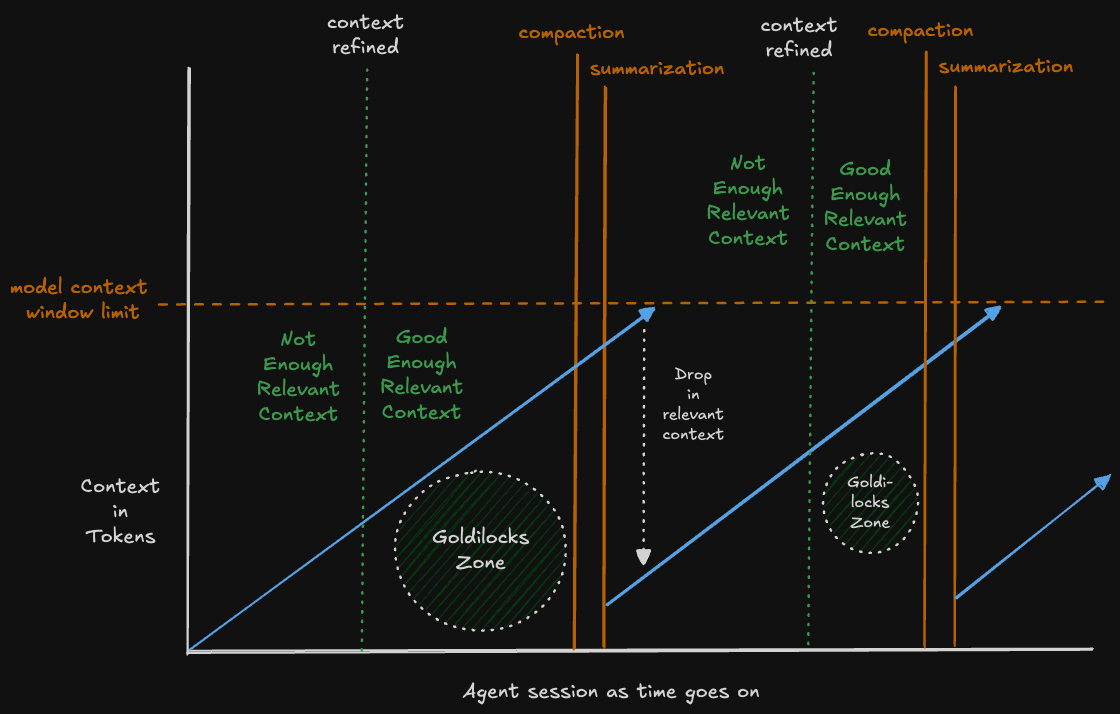
As the session goes on, you can get diminishing returns unless:
- The agent can offload state of a task to markdown, beads, tickets, etc
- The model used to compact succinct summaries of the changes for a simple task to be performed next
- You use 3rd party plugins to get around this behavior
In my experiments with Ollama Cloud and OpenCode, I kept a lot of these basics in mind when trying to determine what models to use for each task.
The Config #
You have either been anticipating this part, skipped straight to this section, or this information
is being summarized by some AI. Either way, I send my regards. In my OpenCode opencode.json, I
include the following for default agents:
  "agent": {
    "plan": {
      "model": "google/gemini-3-pro-preview"
    },
    "general": {
      "model": "ollama/glm-4.7:cloud"
    },
    "explore": {
      "model": "ollama/glm-4.7:cloud"
    },
    "compaction": {
      "model": "ollama/minimax-m2.1:cloud"
    }
  },
Now before you start screaming that I included a non-Ollama model in a blog about Ollama Cloud, I
just want to remind you that I said the premium models are very limited in the $20 plan. I would
get 20 premium Gemini 3 Pro calls a month. I really like Gemini 3 Pro for refining my plan mode
prompt because it’s a thinking model with a large context and is fantastic at developing a plan. I
start abstractly, giving it a general idea of what I am trying to accomplish; including details on
what I have tried to do, what I am intending to do, and what I want at a high level.
plan in OpenCode. It can save you a lot of time and
get you closer to your desired result by using this correctly.For the general and explore, I use GLM 4.7. I really like this model and I look forward to
Z.ai’s future releases. It’s fantastic at coding tasks and even GLM 4.7 Flash works amazingly,
locally.
The most interesting choice is using MiniMax M2.1 for compaction. When this model released, I did
not understand the hype. It was satisfactory at frontend work, but I found myself preferring GLM
4.7. Then I started using MiniMax M2.1 for creating markdowns and realized that the summarizes were
pretty good. It had the same context window as GLM 4.7, but was running faster because it is not a
thinking model (at least not in Ollama). Offloading compaction to MiniMax felt like the right choice
because I didn’t want to spend API token usage on compaction or deal with context lengths of local
models.

Now for the Ollama provider config. I’ll preface this one with saying that it took time to create
these configs, in OpenCode. Both OpenCode and Ollama only provide users with the most basic of
configs. Like no docs tell you that you can add the example opencode.json:
{
  "$schema": "https://opencode.ai/config.json",
  "provider": {
    "ollama": {
      "npm": "@ai-sdk/openai-compatible",
      "name": "Ollama (local)",
      "options": {
        "baseURL": "http://localhost:11434/v1"
      },
      "models": {
        "llama2": {
          "name": "Llama 2"
        }
      }
    }
  }
}
And then simply run:
ollama pull minimax-m2.1:cloud
Which creates a file to let you proxy commands to your local Ollama server to the cloud, using your auth credentials.
Your opencode.json then looks like:
{
  "$schema": "https://opencode.ai/config.json",
  "provider": {
    "ollama": {
      "npm": "@ai-sdk/openai-compatible",
      "name": "Ollama (local)",
      "options": {
        "baseURL": "http://localhost:11434/v1"
      },
      "models": {
        "minimax-m2.1:cloud": {
          "id": "minimax-m2.1:cloud",
          "name": "MiniMax M2.1 (cloud)",
          "tool_call": true
        },
        "llama2": {
          "name": "Llama 2"
        }
      }
    }
  }
}
And now all of a sudden you can select that model or reference it as ollama/minimax-m2.1:cloud.
I purely use Ollama for Ollama Cloud now. I prefer to use local models in either LM Studio or llama.cpp if I am seeking speed and performance. The following is my Ollama provider:
    "ollama": {
      "npm": "@ai-sdk/openai-compatible",
      "name": "Ollama (local)",
      "options": {
        "baseURL": "http://localhost:11434/v1"
      },
      "models": {
        "gpt-oss:120b-cloud": {
          "id": "gpt-oss:120b-cloud",
          "name": "GPT OSS 120B (cloud)",
          "reasoning": true,
          "tool_call": true,
          "variants": {
            "none": {
              "thinking": {
                "type": "disabled"
              }
            },
            "low": {
              "thinking": {
                "type": "enabled",
                "budgetTokens": 8000
              }
            },
            "medium": {
              "thinking": {
                "type": "enabled",
                "budgetTokens": 24000
              }
            },
            "high": {
              "thinking": {
                "type": "enabled",
                "budgetTokens": 48000
              }
            },
            "max": {
              "thinking": {
                "type": "enabled",
                "budgetTokens": 64000
              }
            }
          }
        },
        "gemini-3-flash-preview:cloud": {
          "id": "gemini-3-flash-preview:cloud",
          "name": "Gemini 3 Flash Preview (cloud)",
          "tool_call": true
        },
        "devstral-2:123b-cloud": {
          "id": "devstral-2:123b-cloud",
          "name": "Devstral 2 123B (cloud)",
          "tool_call": true
        },
        "kimi-k2-thinking:cloud": {
          "id": "kimi-k2-thinking:cloud",
          "name": "Kimi K2 Thinking (cloud)",
          "tool_call": true,
          "limit": {
            "context": 262144,
            "output": 128000
          },
          "options": {
            "temperature": 1,
            "top_k": 40,
            "top_p": 0.95,
            "maxOutputTokens": 128000,
            "thinking": {
              "type": "enabled",
              "budgetTokens": 64000
            }
          },
          "variants": {
            "none": {
              "thinking": {
                "type": "disabled"
              }
            },
            "low": {
              "thinking": {
                "type": "enabled",
                "budgetTokens": 8000
              }
            },
            "medium": {
              "thinking": {
                "type": "enabled",
                "budgetTokens": 24000
              }
            },
            "high": {
              "thinking": {
                "type": "enabled",
                "budgetTokens": 48000
              }
            },
            "max": {
              "thinking": {
                "type": "enabled",
                "budgetTokens": 64000
              }
            }
          }
        },
        "minimax-m2.1:cloud": {
          "id": "minimax-m2.1:cloud",
          "name": "MiniMax M2.1 (cloud)",
          "tool_call": true
        },
        "glm-4.7:cloud": {
          "id": "glm-4.7:cloud",
          "name": "GLM 4.7 (cloud)",
          "reasoning": true,
          "tool_call": true,
          "limit": {
            "context": 204800,
            "output": 128000
          },
          "options": {
            "temperature": 0.7,
            "top_k": 40,
            "top_p": 0.95,
            "maxOutputTokens": 128000,
            "thinking": {
              "type": "enabled",
              "budgetTokens": 64000
            }
          },
          "variants": {
            "none": {
              "thinking": {
                "type": "disabled"
              }
            },
            "low": {
              "thinking": {
                "type": "enabled",
                "budgetTokens": 8000
              }
            },
            "medium": {
              "thinking": {
                "type": "enabled",
                "budgetTokens": 24000
              }
            },
            "high": {
              "thinking": {
                "type": "enabled",
                "budgetTokens": 48000
              }
            },
            "max": {
              "thinking": {
                "type": "enabled",
                "budgetTokens": 64000
              }
            }
          }
        }
      }
    },
One thing you may note is variants. OpenCode provides some documentation on this but they are very
useful on any thinking model, as you may want to allocate more tokens, depending on how complex the
task is. Passively watching the OpenCode discord, I saw that this was common for budgets of
thinking:
          "variants": {
            "none": {
              "thinking": {
                "type": "disabled"
              }
            },
            "low": {
              "thinking": {
                "type": "enabled",
                "budgetTokens": 8000
              }
            },
            "medium": {
              "thinking": {
                "type": "enabled",
                "budgetTokens": 24000
              }
            },
            "high": {
              "thinking": {
                "type": "enabled",
                "budgetTokens": 48000
              }
            },
            "max": {
              "thinking": {
                "type": "enabled",
                "budgetTokens": 64000
              }
            }
          }
Next are limits. I only discovered this because of people in the discord. There is no
documentation on this lol. These are less important with the cloud models because you are leveraging
compute that you do not own. However, I heavily use limits on local LLMs, due to resource
constraints. This is just a side-effect of my other configs.
          "limit": {
            "context": 204800,
            "output": 128000
          },
Model options are important because Ollama defaults all its cloud models to its recommended
parameters. This may or may not work for everyone, depending on the task. I tend to tweak these
settings as I start to notice a model drifting or generating undesirable code.
          "options": {
            "temperature": 1,
            "top_k": 40,
            "top_p": 0.95,
            "maxOutputTokens": 128000,
            "thinking": {
              "type": "enabled",
              "budgetTokens": 64000
            }
          },
The thinking budget is the default for when this model gets run as a subagent (since you have more
control with variants as the primary agent).
Here is a quick and dirty rundown of what I used each model for:
| Model | Usage |
|---|---|
| gpt-oss:120b-cloud | Primarily document summarization when dealing with Obsidian markdowns in the AI vault |
| gemini-3-flash-preview | Subagent that can load massive amounts of skills and context to perform a task or create documents |
| devstral-2:123b-cloud | FREE! But I used to use it a lot for code exploration and pattern analysis to load into context |
| kimi-k2-thinking:cloud | Used to use heavily for plans and brainstorming when I needed a good reasoning model. Now used when I hit my Gemini 3 Pro limits and don’t want to use API usage |
| minimax-m2.1:cloud | Compaction GOAT. Sometimes helps do frontend. Sometimes… |
| glm-4.7:cloud | All-Around model of choice for almost every task or subagent default model |
But in the End, Does it Even Matter? #
Not really. Unless you’re trying to find alternatives to being locked in to proprietary AI providers. I love running local LLMs, but for coding I still need to use cloud models for it to be worth it. Ollama Cloud is a good AI provider that I use day-to-day.
Is it better than the coding plans of the top AI providers with their proprietary models? Debatable, but I would take it over two of them. I like the appeal of being able to try out a variety of Open Source models from different labs. It also lets me experiment to see if paying API usage for certain models are worth it.
Finding a good AI provider, with access to good models AND good privacy practices is important. If you’re interested, I suggest you read Ollama’s Terms of Service and Privacy Policy to see if it meets your needs.
liquid/lfm2.5-1.2b, to summarize my verbal
diarrhea.